HouseLens for Rightmove
The portals show you the photos and the asking price. HouseLens adds the record behind the home, on the listing itself: real sold prices, the verified property, area risks, and how the selling agent actually performs. No new tabs, no copy and paste.
An asking price is a marketing decision. What a home is worth shows up in what nearby homes actually sold for, and every completed sale in England and Wales is registered with HM Land Registry. HouseLens puts those registered sales on the listing while you read it, and works out price per square metre so a three-bed cottage and a three-bed new build stop being falsely comparable. Lite and Pro go further and unlock the property's own full sold-price history: what it last went for, when, and how the area has moved since.
Rightmove hides the full address, which makes every other check harder: you cannot pull the right EPC, the right title, or the right sold history for a home you cannot name. HouseLens recovers the address and confirms it against the EPC certificate before marking it verified, then shows tenure, floor area and energy rating for the actual property. When it cannot be certain, it says so instead of guessing. That address discipline is what makes the rest of the panel trustworthy, and it is where most tools quietly fall down.
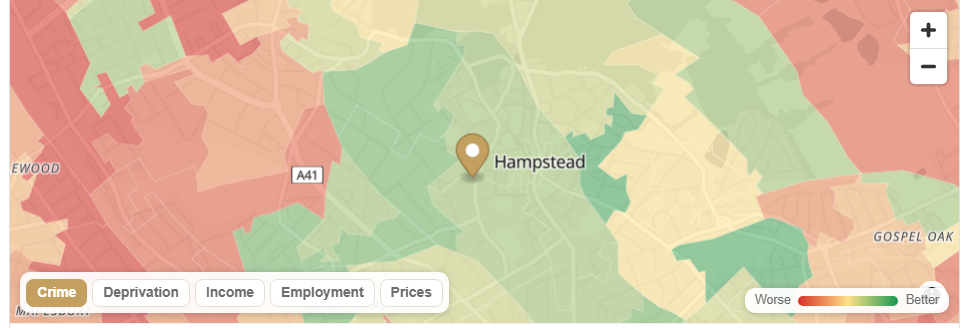
Crime rates from police.uk, schools with Ofsted ratings, flood risk from the Environment Agency, broadband and mobile coverage from Ofcom, and planning designations from official open data. It is the same research you would do across six tabs, done in one panel. If you would rather explore an area before you have a specific listing, our free area heat map covers crime, income, deprivation and house prices for any postcode.
This is the part no other extension has. HouseLens is built by AgentSeeker, which ranks UK estate agents on observable performance. On every listing you can see how the selling agent compares with others working the same patch. For buyers it is context on who you are dealing with; for sellers browsing the competition it is a preview of who might sell theirs.
Two designations change what you can do with a home and rarely appear on the listing: conservation areas and listed status. Both usually surface weeks later in a conveyancer's searches, after you have offered. HouseLens flags both up front. Read more on the conservation area checker and the listed building checker, or check the connection with the broadband checker before you fall for the kitchen.
There are several good overlays for Rightmove, and it is worth knowing what each is for. As of July 2026, the landscape looks like this:
| Extension | What it focuses on |
|---|---|
| HouseLens | Sold-price history, the verified address and EPC, area data, and the selling agent's track record. Free panel; Lite and Pro add per-property depth. |
| Area360 | Free property and area statistics overlay: prices, crime, schools and deprivation data on the listing. |
| Property Tracker | Tracking asking-price changes on listings you follow. |
| PaTMa Property Insights | Investor analysis: yields, cash flow and deal metrics. |
| Propbar | A property data toolbar with price history and area information. |
Property Log, for years the best-known price-drop tracker, left the Chrome Web Store in early 2025. If you used it, the closest modern equivalent for judging a price is registered sold history rather than asking-price movements, which is exactly what HouseLens surfaces.
The honest summary: if all you want is area statistics, several free tools do that well, including ours. HouseLens earns its place with the things the others do not hold: the verified address, the full Land Registry record for the property itself, and agent performance data from a comparison service that publishes how its rankings work.
The free panel gives you area data, area-level sold prices and agent rankings on every listing, with no account needed. Lite adds the verified exact address and full per-property sold history with 20 property lookups a month; Pro raises that to 100. A lookup is only spent the first time you open a new property; revisiting it is free. Cancel any time from My HouseLens.
Installing takes under a minute: add it from the Chrome Web Store, open any Rightmove or Zoopla listing, and the panel appears under the listing header. It works in Chrome and Edge on desktop.
Sold price history on the listing · EPC lookup · Broadband checker · Conservation area checker · Listed building checker
Free to start, works on Rightmove and Zoopla, no account needed to look.
Add to your browser